Messy PDF
Scanned table page
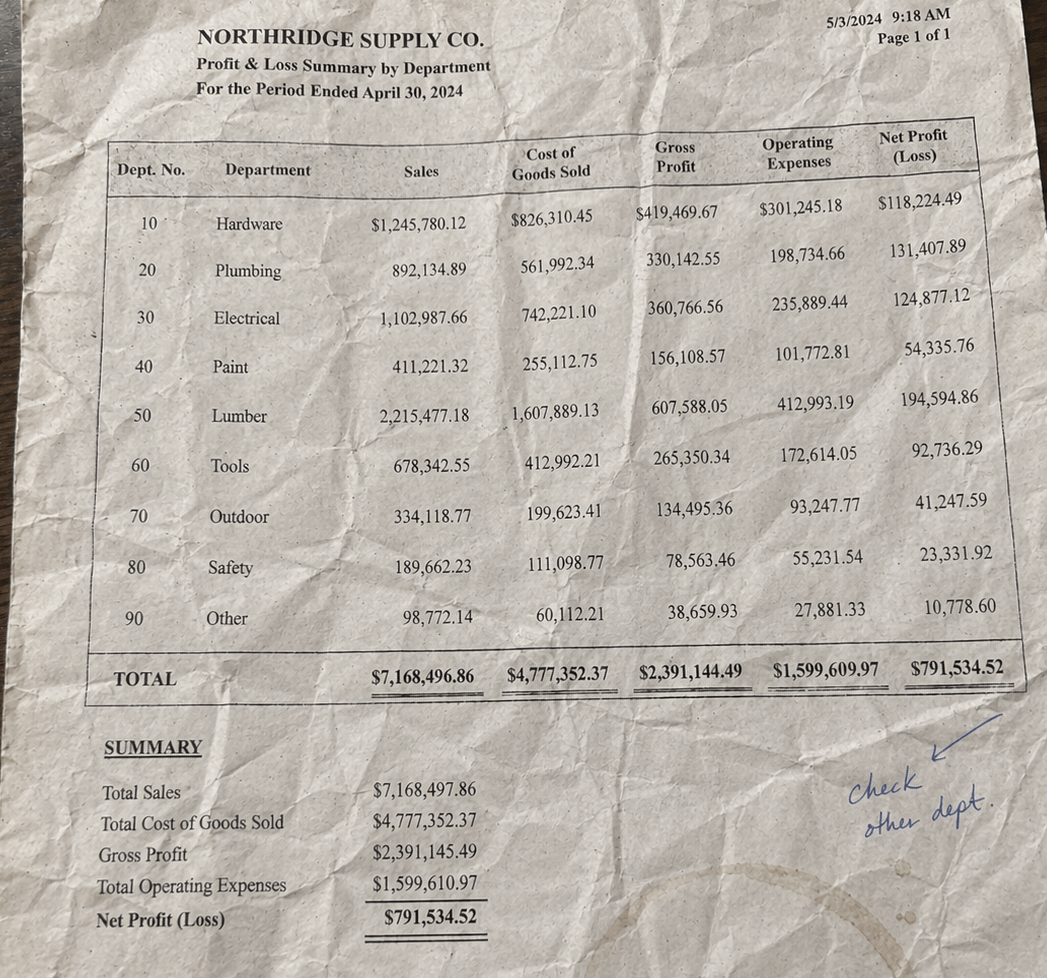
Dense scan noise, broken lines, and missing cells make copy-paste unreliable.
Upload a messy table source, review flagged rows, and export a clean result to Excel or CSV only when it looks right.

Upload a PDF, review the detected table, and export only when the rows look right.
Start with a digital PDF, image, or scanned table page. Any messy table that breaks copy-paste is a good fit.
Tremvio maps the table into typed columns so you can review headers, row values, and repeated cells before export.
Use confidence and source highlights to inspect uncertain rows, then export the cleaned table to CSV or Excel.
Keep the table structure intact, inspect uncertain rows, and export only when the sheet looks ready to use.
When a PDF table has awkward spacing or multiple columns, the goal is a clean sheet instead of a wall of pasted text.
Confidence helps you focus on the few rows that need attention. Each value stays linked to its source in the PDF.
Long tables often continue across several PDF pages. The cleanup step matters before you hand the file to Excel.
Scanned pages, image-based tables, broken layouts, and multi-page tables that need cleanup before spreadsheet work.
Turn noisy scans into a clean sheet with separated columns and a review step before export.
Capture rows from screenshots, photos, and image-heavy pages in a format you can review before export.
When spacing, merged cells, or uneven lines break copy-paste, Tremvio gives you a faster review pass with flagged rows and source context.
When the same table runs over several PDF pages, keep the rows together instead of rebuilding the sheet by hand.
Instead of rereading every cell, focus on the rows Tremvio marks as uncertain and export when the table looks right.
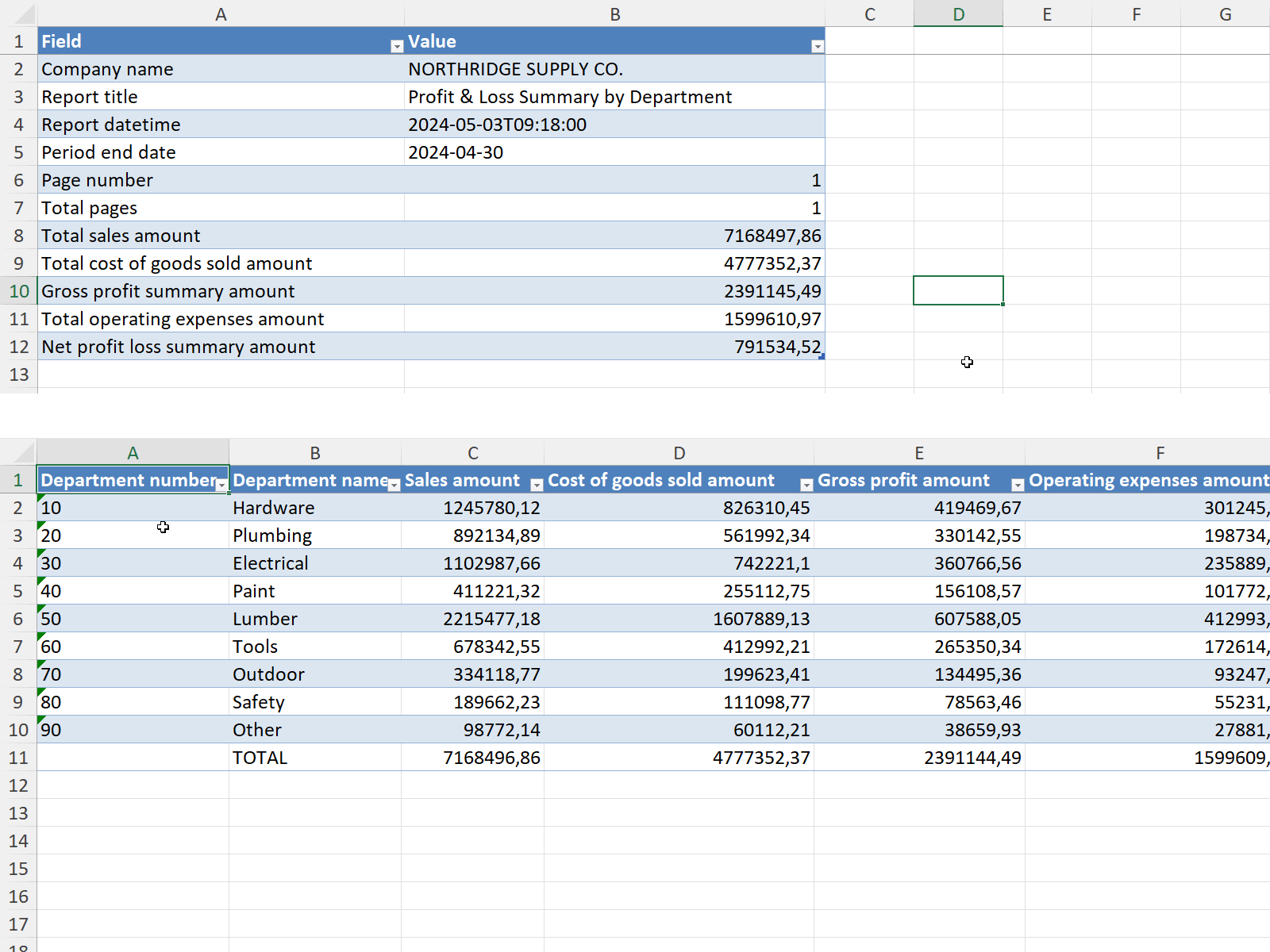
See how the same document appears in Tremvio, then as a clean Excel export.
Dense scan noise, broken lines, and missing cells make copy-paste unreliable.
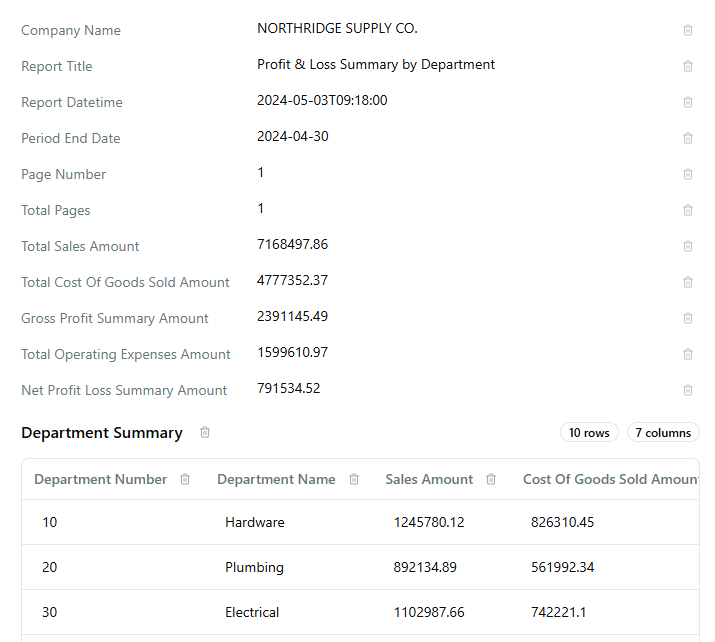
Columns are normalized, uncertain values stay visible, and review badges highlight what needs attention.
The point is not to promise magic. It is to make the workflow clear before someone uploads a file or starts a paid plan.
Paid plans renew monthly until canceled before the next billing cycle.
Tremvio provides receipts and billing records for paid purchases.
Questions go to support email and a human replies within one business day.
Flagged rows stay visible so you can check the table before you download it.
Tremvio focuses on turning messy PDFs, images, and scans into clean tables.
Start with 10 free pages each month, then move to a paid plan when table cleanup becomes recurring work.
Tremvio is positioned around messy table sources: digital PDFs, image-based pages, and scanned table pages. Those are the files where copy-paste usually breaks down first.
It means you review the extracted fields and flagged rows before export. The goal is a clean table you can trust, not a black box that asks you to accept every row blindly.
Yes, scanned table pages are part of the focus. They usually need more review than clean digital PDFs, which is why the review step matters.
The landing is centered on clean table output for spreadsheet workflows, especially CSV and Excel.
Yes. The transformation preview section shows a before-and-after example first, then you can upload your own PDF when you want to test the real flow.
There is a free tier with 10 pages per month, then paid plans for higher monthly volume: Starter at $19/month for 100 pages and Growth at $49/month for 300 pages. Paid subscriptions renew monthly until canceled, pages reset each billing cycle, and applicable taxes may be added at checkout.
For pricing purposes, a page means one source page processed by Tremvio during extraction.
If you reach your monthly page allowance, additional processing may pause until the next monthly reset or until you move to a larger plan.
You can cancel before the next renewal date so the subscription does not renew again. When a billing portal is available, use it there. You can also email support for help.
Yes. Depending on the buyer location and transaction, applicable taxes such as VAT, sales tax, or GST may be added during checkout.
Yes. Tremvio provides receipts and related billing records for paid purchases.
See the review flow on a real file, then export a clean table when the rows look right.